TalentMatch Developer Guide
Acknowledgements
Base Project
- TalentMatch is a brownfield project built upon the foundation provided by AddressBook Level-3.
- The base code, user guide, and developer guides were adapted from the original AB3 project.
AI Assistance Tools
During the development of this application, the following AI tools were utilized:
- Cursor (running Claude Sonnet 3.7) - Assisted with JavaFX UI component development and styling
- GitHub Copilot - Provided code completion and suggestions throughout the application
These AI tools primarily contributed to:
- UI components development in JavaFX
- Styling and design improvements
- Code auto-completion across the application
- Test code generation
Setting up, getting started
Refer to the guide Setting up and getting started.
Design
Architecture
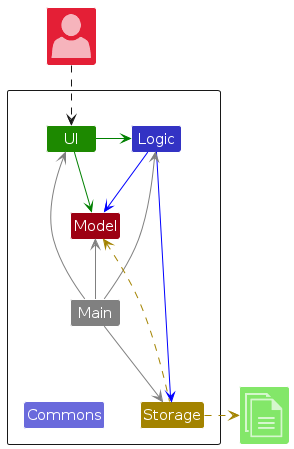
The Architecture Diagram given above explains the high-level design of the App.
Given below is a quick overview of main components and how they interact with each other.
Main components of the architecture
Main (consisting of classes Main and MainApp) is in charge of the app launch and shut down.
- At app launch, it initializes the other components in the correct sequence, and connects them up with each other.
- At shut down, it shuts down the other components and invokes cleanup methods where necessary.
The bulk of the app's work is done by the following four components:
UI: The UI of the App.Logic: The command executor.Model: Holds the data of the App in memory.Storage: Reads data from, and writes data to, the hard disk.
Commons represents a collection of classes used by multiple other components.
How the architecture components interact with each other
The Sequence Diagram below shows how the components interact with each other for the scenario where the user issues the command del 1.
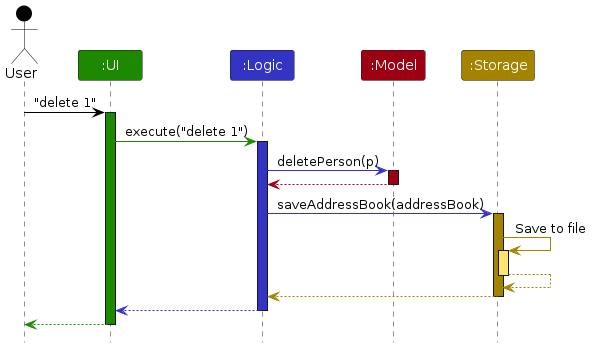
Each of the four main components (also shown in the diagram above),
- defines its API in an
interfacewith the same name as the Component. - implements its functionality using a concrete
{Component Name}Managerclass (which follows the corresponding APIinterfacementioned in the previous point.
For example, the Logic component defines its API in the Logic.java interface and implements its functionality using the LogicManager.java class which follows the Logic interface. Other components interact with a given component through its interface rather than the concrete class (reason: to prevent outside component's being coupled to the implementation of a component), as illustrated in the (partial) class diagram below.
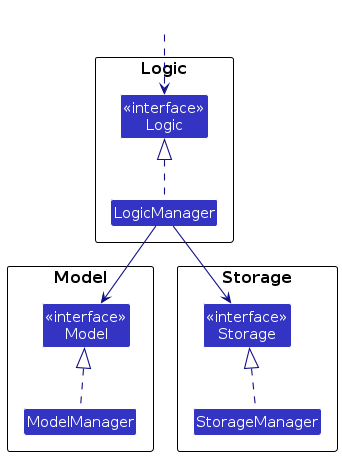
The sections below give more details of each component.
UI component
The API of this component is specified in Ui.java
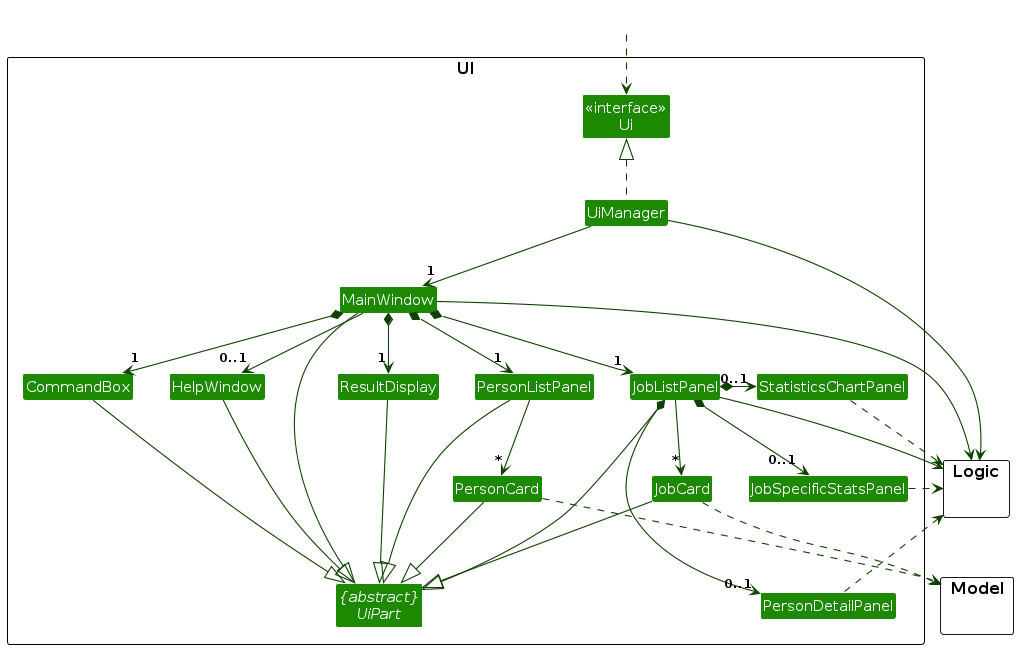
The UI consists of a MainWindow that is made up of parts e.g.CommandBox, ResultDisplay, PersonListPanel, etc. All these, including the MainWindow, inherit from the abstract UiPart class which captures the commonalities between classes that represent parts of the visible GUI.
The UI component uses the JavaFx UI framework. The layout of these UI parts are defined in matching .fxml files that are in the src/main/resources/view folder. For example, the layout of the MainWindow is specified in MainWindow.fxml
The UI component,
- executes user commands using the
Logiccomponent. - listens for changes to
Modeldata so that the UI can be updated with the modified data. - keeps a reference to the
Logiccomponent, because theUIrelies on theLogicto execute commands. - depends on some classes in the
Modelcomponent, as it displaysPersonobject residing in theModel.
Logic component
API : Logic.java
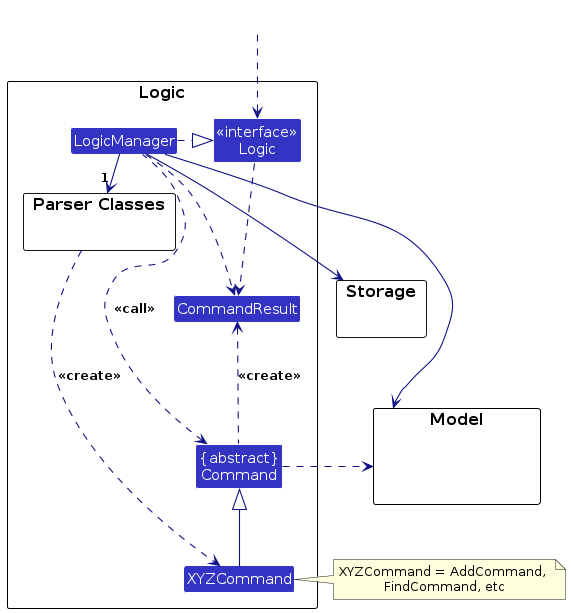
Here's a (partial) class diagram of the Logic component:
The sequence diagram below illustrates the interactions within the Logic component, taking execute("del 1") API call as an example.
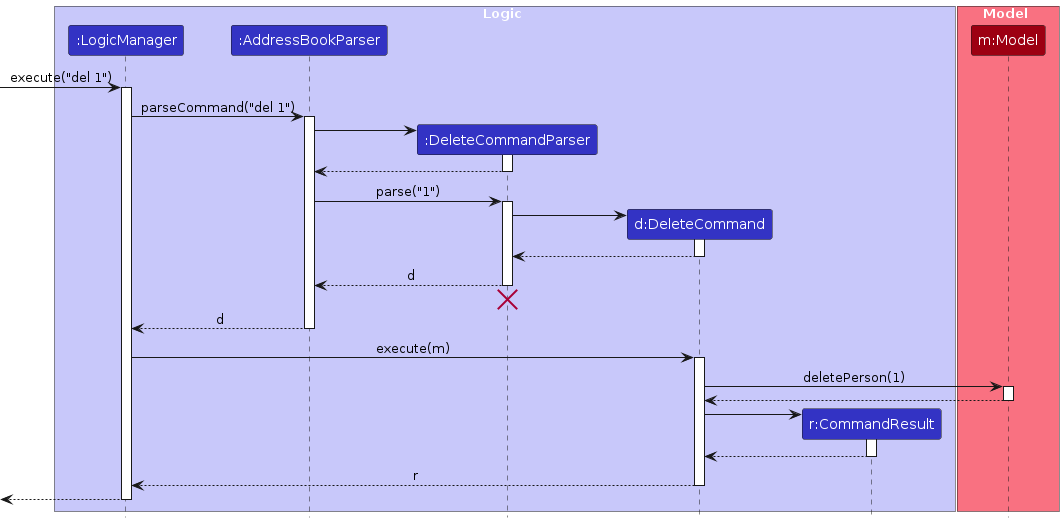
Note: The lifeline for DeleteCommandParser should end at the destroy marker (X) but due to a limitation of PlantUML, the lifeline continues till the end of diagram.
How the Logic component works:
- When
Logicis called upon to execute a command, it is passed to anAddressBookParserobject which in turn creates a parser that matches the command (e.g.,DeleteCommandParser) and uses it to parse the command. - This results in a
Commandobject (more precisely, an object of one of its subclasses e.g.,DeleteCommand) which is executed by theLogicManager. - The command can communicate with the
Modelwhen it is executed (e.g. to delete a person).
Note that although this is shown as a single step in the diagram above (for simplicity), in the code it can take several interactions (between the command object and theModel) to achieve. - The result of the command execution is encapsulated as a
CommandResultobject which is returned back fromLogic.
Here are the other classes in Logic (omitted from the class diagram above) that are used for parsing a user command:
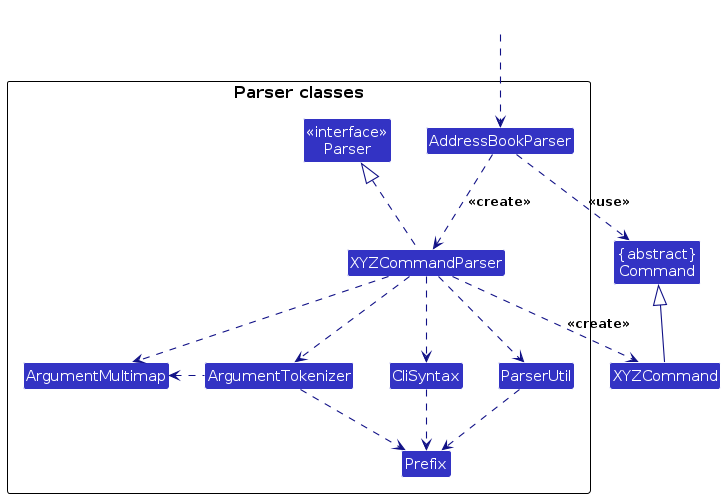
How the parsing works:
- When called upon to parse a user command, the
AddressBookParserclass creates anXYZCommandParser(XYZis a placeholder for the specific command name e.g.,AddCommandParser) which uses the other classes shown above to parse the user command and create aXYZCommandobject (e.g.,AddCommand) which theAddressBookParserreturns back as aCommandobject. - All
XYZCommandParserclasses (e.g.,AddCommandParser,DeleteCommandParser, ...) inherit from theParserinterface so that they can be treated similarly where possible e.g, during testing.
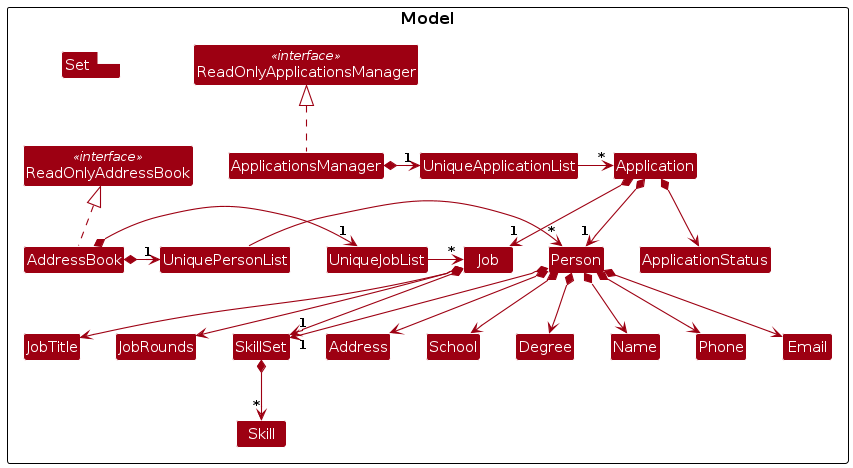
Model component
API : Model.java
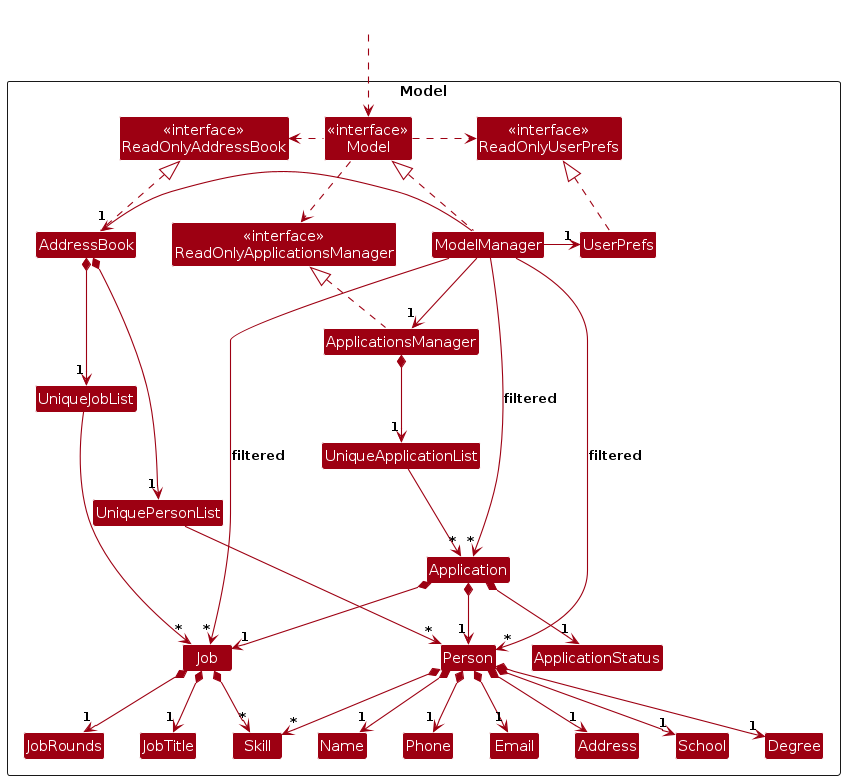
The Model component,
- stores the address book data i.e., all
Personobjects (which are contained in aUniquePersonListobject), allJobobjects (which are contained in aUniqueJobListobject) and allApplicationobjects (which are contained in aUniqueApplicationList). - stores the currently 'selected'
Person,Job,Applicationobjects (e.g., results of a search query) as a separatestackable filtered_ listwhich is exposed to outsiders as an unmodifiableObservableList<Person>that can be 'observed' e.g. the UI can be bound to this list so that the UI automatically updates when the data in the list change. - stores a
UserPrefobject that represents the user's preferences. This is exposed to the outside as aReadOnlyUserPrefobjects. - does not depend on any of the other three components (as the
Modelrepresents data entities of the domain, they should make sense on their own without depending on other components)
Note: An alternative (arguably, a more OOP) model is given below. It has a Skill list in the TalentMatch, which Person references. This allows TalentMatch to only require one Skill object per unique skill, instead of each Person needing their own Skill objects.
Storage component
API : Storage.java
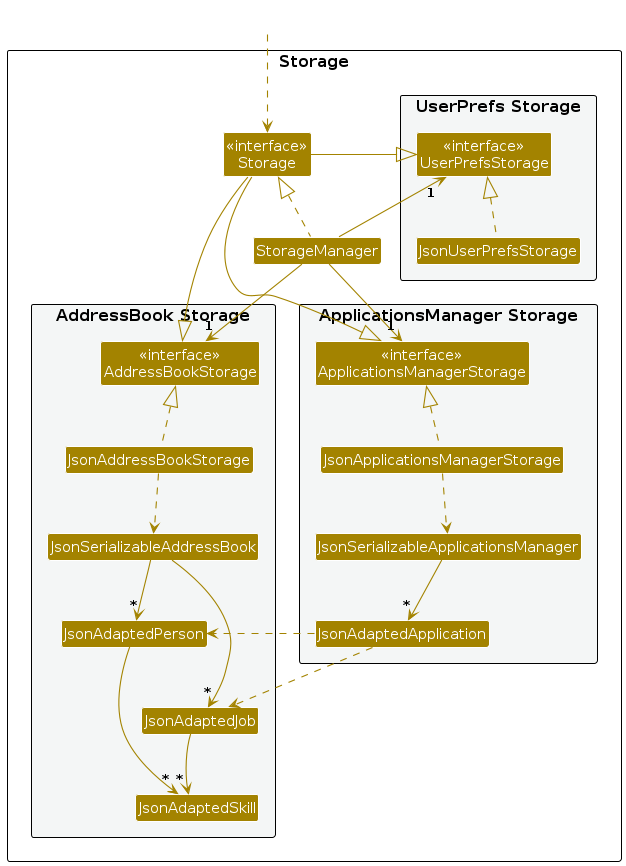
The Storage component,
- can save both address book data, applications manager data and user preference data in JSON format, and read them back into corresponding objects.
- inherits from both
AddressBookStorage,ApplicationsManagerStorageandUserPrefStorage, which means it can be treated as either one (if only the functionality of only one is needed). - depends on some classes in the
Modelcomponent (because theStoragecomponent's job is to save/retrieve objects that belong to theModel)
Common classes
Classes used by multiple components are in the seedu.address.commons package.
Documentation, logging, testing, configuration, dev-ops
Appendix: Requirements
Product scope
Target user profile:
- TalentMatch is specifically tailored for recruitment professionals in Small-Medium Enterprises (SMEs) who:
- Manage multiple university candidate pipelines simultaneously and efficiently
- Value speed and efficiency in their workflow
- Are comfortable with typing-based interfaces
- Prefer lightweight, standalone solutions over complex enterprise HR systems
- Work for SMEs with budget and infrastructure constraints
Value proposition:
TalentMatch enables HR recruiters to manage the full recruitment lifecycle more efficiently than typical mouse/GUI driven applications by:
- Managing applicants, jobs, and applications with a streamlined command-line interface that's faster than traditional GUI applications
- Providing specialized views for different recruiting scenarios (Person View, Job View)
- Supporting multi-dimensional search capabilities across skills, application status, and other candidate attributes
- Enabling efficient tracking of candidates through interview rounds
- Maintaining clear relationships between applicants and the positions they've applied for
- Offering command history functionality to speed up repetitive tasks
- Providing visual indicators of application progress through status tracking
- Allowing focused management of internship applications with appropriate attributes
- Supporting skill-based matching between candidates and job requirements
- Enabling view-specific commands that improve recruiter workflow efficiency
- Being a self-contained, self-sufficient solution that does not impose vendor lock-in
These features combine to provide HR recruiters with a comprehensive tool for managing the entire recruitment process from job creation to final candidate selection.
User stories
Priorities:
- High (must have) -
* * * - Medium (nice to have) -
* * - Low (unlikely to have) -
*
| Priority | As a … | I want to … | So that I can… |
|---|---|---|---|
* * * | HR Recruiter | add a new person with their details | keep track of potential candidates for internship positions |
* * * | HR Recruiter | edit a person's information | update their details when they provide new information |
* * * | HR Recruiter | delete a person | remove entries of candidates no longer under consideration |
* * * | HR Recruiter | find persons by various criteria | quickly locate specific candidates without going through the entire list |
* * * | HR Recruiter | see a list of all persons | get an overview of all potential candidates |
* * * | HR Recruiter | add a job with title, rounds, and required skills | create new internship positions for candidates to apply to |
* * * | HR Recruiter | edit job details | update job requirements or descriptions as needed |
* * * | HR Recruiter | delete a job | remove positions that are no longer available |
* * * | HR Recruiter | find jobs by keywords | quickly locate specific job positions without browsing through all listings |
* * * | HR Recruiter | list all jobs | get an overview of all available positions |
* * * | HR Recruiter | create an application linking a person to a job | track which candidates are applying for which positions |
* * * | HR Recruiter | delete an application | remove incorrect applications or those no longer being considered |
* * * | HR Recruiter | advance an application to the next interview round | track a candidate's progress through the interview process |
* * * | HR Recruiter | find applications by status | quickly locate applications at specific stages in the recruitment process |
* * * | HR Recruiter | switch between person view and job view | focus on different aspects of the recruitment process as needed |
* * | HR Recruiter | view detailed information of a specific job | see its requirements and applicant distribution across interview rounds |
* * | HR Recruiter | view detailed information of an applicant from job view | see their qualifications and application progress without switching views |
* * | HR Recruiter | use command history | recall and reuse previous commands without retyping them |
* * | HR Recruiter | see a visual representation of application progress | quickly gauge where each candidate stands in the interview process |
* * | HR Recruiter | find applications for a specific job | focus on managing candidates for a particular position |
* * | HR Recruiter | find applications with a specific status for a specific job | manage candidates at the same stage in the interview process for a particular role |
* * | HR Recruiter | have context-specific commands | have a more intuitive workflow based on whether I'm in person view or job view |
* * | HR Recruiter | specify skills for both jobs and persons | match candidates to positions based on skill requirements |
* * | HR Recruiter | view all applications for a job | see all candidates being considered for a specific position |
* * | HR Recruiter | clear all data from the system | start fresh when beginning a new recruitment cycle |
* | HR Recruiter | have data automatically saved | not worry about losing information if the application closes unexpectedly |
* | HR Recruiter | view help information | understand how to use the commands in the system |
* | HR Recruiter | see a graphical representation of interview round distribution | quickly understand the distribution of applications across different stages |
* | HR Recruiter | continue searches based on previously filtered results | gradually narrow down my search to find exactly what I'm looking for |
* | HR Recruiter | have case-insensitive search for most fields | find results regardless of letter casing used |
Use cases
(For all use cases below, the System is TalentMatch and the Actor is the HR manager (HR), unless specified otherwise)
Use case: Remove a person
MSS
User requests to list all persons.
TalentMatch shows a list of all persons with their indices.
User requests to delete a specific person in the list by their index.
TalentMatch deletes the person.
Use case ends.
Extensions
1a. User is in Job View.
- 1a1. TalentMatch prompts user to switch to Person View.
Use case resumes at step 2.
- 1a1. TalentMatch prompts user to switch to Person View.
2a. The given index is invalid.
- 2a1. TalentConnect shows an error message.
Use case resumes at step 3.
- 2a1. TalentConnect shows an error message.
Use case: Add a job
MSS
- User requests to add a job.
- TalentMatch prompts for details of the job (title, rounds, required skills).
- User fills in the relevant details.
- TalentMatch adds the job to the system. Use case ends.
Extensions
3a. User provides invalid job details (missing required fields/ wrong format).
- 3a1. TalentMatch shows an error message.
- 3a2. User corrects the details.
Use case resumes at step 4.
3b. TalentMatch finds an existing job with identical job title.
- 3b1. TalentMatch informs HR of the duplicate.
- 3b2. HR modifies job title to make it unique.
Use case resumes at step 4.
Use case: Create an application
MSS
- User requests to create an application.
- TalentMatch prompts for the person and job to link.
- User selects the person index and job index.
- TalentMatch creates the application linking the person and job Use case ends.
Extensions
3a. The person doesn't exist in the system.
- 3a1. User adds the person first.
Use case resumes at step 3.
- 3a1. User adds the person first.
3b. The job doesn't exist in the system.
- 3b1. User adds the job first.
Use case resumes at step 3.
- 3b1. User adds the job first.
4a. TalentMatch detects an existing application for the same person and job.
- 4a1. TalentMatch raises an error to inform user of the duplicate application.
Use case ends.
- 4a1. TalentMatch raises an error to inform user of the duplicate application.
Use case: List all jobs
MSS
- User requests to list all jobs
- TalentMatch shows a list of job openings
Use case ends.
Extensions
- 1a. User is in Person View.
- 1a1. TalentMatch prompts user to switch to Job View.
Use case resumes at step 2.
- 1a1. TalentMatch prompts user to switch to Job View.
Use case: Delete an application
MSS
User requests to delete an application.
TalentMatch prompts user for job index and application index.
User selects the job index and application index in the list.
TalentMatch deletes the application.
Use case ends.
Extensions
1a. User is in Person View.
- 1a1. TalentMatch prompts user to switch to Job View.
Use case resumes at step 2.
- 1a1. TalentMatch prompts user to switch to Job View.
3a. User provides invalid job index or application index.
- 3a1. TalentMatch shows an error message.
- 3a2. User corrects the index.
Use case resumes at step 4.
Use case: Find a job
MSS
User requests to list jobs.
TalentMatch shows a list of jobs.
User requests to find a job by a keyword.
TalentMatch filters and list any jobs that contain the full keyword.
Use case ends
Extensions
1a. User is in Person View.
- 1a1. TalentMatch prompts user to switch to Job View.
Use case resumes at step 2.
- 1a1. TalentMatch prompts user to switch to Job View.
3a. User mistypes the keyword.
- 3a1. TalentMatch returns the wrong list/ empty list of jobs.
- 3a2. User refreshes the list of jobs.
Use case resumes at step 3.
Non-Functional Requirements
- Should work on any mainstream OS as long as it has Java
17or above installed. - Should be able to hold up to 100 persons without a noticeable sluggishness in performance for typical usage.
- A user with above average typing speed for regular English text (i.e. not code, not system admin commands) should be able to accomplish most of the tasks faster using commands than using the mouse.
- Should respond to any user command within 2 seconds.
- Should be usable by a person who has never used a contact management system before with minimal training.
- User data should be stored in a human-editable json file for easy backup and transfer.
- The system should be able to recover from unexpected shutdowns without data loss.
Glossary
Mainstream OS: Windows, Linux, macOS - the operating systems that TalentMatch is designed to run on.
HR Recruiter: The main user of TalentMatch; a professional responsible for managing the application timeline and recruitment process for job candidates.
Applicant/Candidate: A prospective university student who is applying for a job opening.
Person: An entity in the TalentMatch system representing a potential job candidate with attributes such as name, phone number, email, address, university, and skills.
Job: An entity in the TalentMatch system representing an available position with attributes such as job title, required number of interview rounds, and required skills.
Application: A relationship entity linking a Person to a Job, tracking the progress of a candidate through the recruitment process for a specific position.
Interview Round: A stage in the recruitment process that a candidate must progress through, represented by a numerical value in the Application status.
Skill: A capability or technical knowledge that can be possessed by a Person or required by a Job, used for matching candidates to positions.
Person View: A UI mode that focuses on listing and managing Person entities.
Job View: A UI mode that focuses on listing and managing Job entities and their associated applications.
Application Status: A numerical value indicating a candidate's progress through the interview process:
- Status 0: The applicant has just applied and hasn't undergone any interviews yet.
- Status k (where k is between 1 and total rounds - 1): The applicant has successfully PASSED round k and is waiting for the next round.
- Status = Job Rounds: The applicant has passed all interview rounds and has been offered the position.
UniquePersonList: A data structure in the Model component that stores all Person objects without duplicates.
UniqueJobList: A data structure in the Model component that stores all Job objects without duplicates.
UniqueApplicationList: A data structure in the Model component that stores all Application objects without duplicates.
Brownfield Project: A software development project that builds upon existing code rather than starting from scratch (as opposed to a greenfield project).
Appendix: Instructions for manual testing
Given below are instructions to test the app manually.
Note: These instructions only provide a starting point for testers to work on; testers are expected to do more exploratory testing.
Launch and shutdown
Initial launch
- Download the jar file and copy into an empty folder
- Double-click the jar file
Expected: Shows the GUI with a set of sample data. The window size is adjustable.
Saving window preferences
- Resize the window to an optimum height and width. Move the window to a different location. Close the window.
- Re-launch the app by double-clicking the jar file.
Expected: The most recent window size and location is retained.
Shutdown
- Close the application window
Expected: Application closes and all data is saved.
- Close the application window
Person Management
Adding a person
- Prerequisites: List all persons using the
listcommand. - Test case:
add n/John Doe p/98765432 e/john@example.com a/123 Jurong Street s/NUS d/CS
Expected: Person is added to the list. Details of the added person shown in the status message. - Test case:
add n/John Doe
Expected: No person is added. Error details shown in the status message. - Other incorrect add commands to try:
add,add n/,add p/12345678
Expected: Similar to previous.
- Prerequisites: List all persons using the
Deleting a person
- Prerequisites: List all persons using the
listcommand. Multiple persons in the list. - Test case:
del 1
Expected: First person is deleted from the list. Details of the deleted person shown in the status message. - Test case:
del 0
Expected: No person is deleted. Error details shown in the status message. - Other incorrect delete commands to try:
delete,del x,...(where x is larger than the list size)
Expected: Similar to previous.
- Prerequisites: List all persons using the
Finding a person
- Prerequisites: List all persons using the
listcommand. - Test case:
find John
Expected: Shows a list of persons with names containing "John". - Test case:
find 98765432
Expected: Shows a list of persons with phone numbers containing "98765432". - Test case:
find john@example.com
Expected: Shows a list of persons with emails containing "john@example.com".
- Prerequisites: List all persons using the
Job Management
Adding a job
- Prerequisites: List all jobs using the
listjobcommand. - Test case:
addjob jt/Software Engineer jr/3 k/Java k/Python
Expected: Job is added to the list. Details of the added job shown in the status message. - Test case:
addjob t/Software Engineer
Expected: No job is added. Error details shown in the status message. - Other incorrect addjob commands to try:
addjob,addjob t/,addjob s/Java
Expected: Similar to previous.
- Prerequisites: List all jobs using the
Deleting a job
- Prerequisites: List all jobs using the
listjobcommand. Multiple jobs in the list. - Test case:
deljob 1
Expected: First job is deleted from the list. Details of the deleted job shown in the status message. - Test case:
deljob 0
Expected: No job is deleted. Error details shown in the status message. - Other incorrect deletejob commands to try:
deletejob,deljob x,...(where x is larger than the list size)
Expected: Similar to previous.
- Prerequisites: List all jobs using the
Finding a job
- Prerequisites: List all jobs using the
listjobcommand. - Test case:
findjob Software
Expected: Shows a list of jobs with titles containing "Software". - Test case:
findjob Java
Expected: Shows a list of jobs requiring the skill "Java".
- Prerequisites: List all jobs using the
Application Management
Creating an application
- Prerequisites: List all persons and jobs using the
listandlistjobcommands. - Test case:
addapp ij/1 ip/1
Expected: Application is created linking the first person and first job. Details shown in the status message. - Test case:
addapp ij/0 ip/1
Expected: No application is created. Error details shown in the status message. - Other incorrect apply commands to try:
addapp,apply ij/x ip/y,...(where x or y is larger than the list size)
Expected: Similar to previous.
- Prerequisites: List all persons and jobs using the
Deleting an application
- Prerequisites: List all jobs using the
listjobcommand. Each job card contains multiple applications in the list. - Test case:
delapp ij/1 ia/1
Expected: First application for the first job is deleted from the list. Details of the deleted application shown in the status message. - Test case:
delapp ij/0 ia/1
Expected: No application is deleted. Error details shown in the status message. - Other incorrect deleteapp commands to try:
delapp,delapp ij/x ia/y,...(where x is larger than the list size and y is larger than the number of applications for the said job)
Expected: Similar to previous.
- Prerequisites: List all jobs using the
Finding applications
- Prerequisites: List all jobs using the
listjobcommand. - Test case:
findapp as/3
Expected: Shows a list of job cards applications corresponding to the application status queried. - Test case:
findapp as/1
Expected: Shows a list of applications with application status of 1. - Test case:
findapp ij/1 as/1
Expected: Shows a list of applications with application status of 1 for job at index 1.
- Prerequisites: List all jobs using the
View Management
Switching views
- Test case:
switch
Expected: Switches to person view when in job view, showing the person list panel. - Test case:
switch
Expected: Switches to job view when in person view, showing the job list panel.
- Test case:
Saving data
Dealing with missing/corrupted data files
- Delete the
data/addressbook.jsonfile
Expected: Application starts with a new default address book and default applications manager. - Delete the
data/applicationsmanager.jsonfile
Expected: Application starts with a new empty applications manager and address book stays the same. - Corrupt the
data/addressbook.jsonfile by adding invalid JSON
Expected: Application starts with a new default address book and default applications manager. - Corrupt the
data/applicationsmanager.jsonfile by adding invalid JSON
Expected: Application starts with a new empty applications manager and address book stays the same.
- Delete the
Help Command
Accessing help
- Test case:
help
Expected: Opens the help window showing command usage information.
- Test case:
Appendix: Planned Enhancements
Team Size: 4
Improve duplicate person detection Currently, duplicate detection for
Persononly uses thePerson.namefields for comparison, which can inconvenience users wanting to add multiple contacts with the same name. It also results in issues like multiple people being able to be added to the address book with different names but the same contact details, which may not reflect a real-world scenario faithfully. We plan to extend duplicate detection to become more robust, comparing multiple fields (such as names, phone numbers, emails etc.), only considering a contact duplicate if multiple fields match. This logic is non-trivial.Fix multiple window display issue When using multiple screens, if users move the application to a secondary screen, and later switch to using only the primary screen, the GUI opens off-screen. We plan to implement logic to detect and remedy this scenario by ensuring the application window always appears within the bounds of available screens, eliminating the need for users to manually delete the
preferences.jsonfile.Improve data recovery for corrupted storage files Currently, when storage files (
applicationsmanager.jsonandaddressbook.json) are detected to have corruption or incorrect formatting, the application wipes user data and starts with a clean slate, resulting in complete data loss even from minor formatting errors. We plan to implement a more robust data recovery mechanism that attempts to salvage uncorrupted portions of the files, creates automatic backups before wiping data, and provides users with options to restore from previous states rather than immediately discarding all data.Improve UI pie chart Currently, a bug in the legend and the pie chart component makes it such that past 33 jobs with applicants, the legend of the pie chart fails to render. We believe this is due to a CSS bug. We intend to fix this in a future iteration.
Improve skill tag validation and parsing Currently, the skill tag with prefix
k/is limited through input validation to single words with no spaces, and with only.and/as special characters allowed. We plan to expand the input validation and parsing such that skills can accept multi-word inputs and more special characters, in a manner that is meaningful.Improve parser to avoid misdetection of prefixes Currently, our prefixes are detected through a pattern similar to (simplified for brevity here)
<SPACE>/<PREFIX><CONTENT>. However, in fields such asAddressandNamethat accept multi-word inputs and special characters, sometimes a misdetection of prefixes can be triggered (e.g. inputting a name withs/owill detect a school prefix). We intend to fix this by employing more robust input validation and checking as well as possibly moving to a less ubiquitous character to demarcate a prefix, such as a backslash, which should greatly reduce such conflicts.Better warnings for incorrect usage of
edit/editjobcommands. Due to the manner in which both edit commands detect changes to thePersonorJob, error handling is not specific to the point where we can give targeted warnings or error messages to the end user based on the actual error; instead, our warnings are quite general at the moment. We intend to improve this by improving upon the shared backend code that theeditcommands use to detect and catch exceptions.Improve UI bar chart: Currently, a bug in the legend and the bar chart component makes it such that past 5 schools with applicants, or past 4 applicants per school, the legend of the bar chart fails to render requisite schools or applicants. We believe this is due to a CSS bug. We intend to fix this in a future iteration.
Appendix: Effort
Difficulty Level
We felt that the difficulty of the project was quite high, especially as took on quite ambitious features. We implemented a significant number of features, including, but not limited to
- Large changes to the UI to enable custom components such as charts, progress bars etc.
- Logic to implement multiple views that can be toggled between, with data consistency between the different views
ApplicationandApplicationManager, which served as a way for us to manage the relationship betweenPersonandJobin an immutable, side-effect free manner
Challenges Faced
On the project management aspect, we often faced significant merge conflicts in the earlier iterations. Since the features we were implementing were often so large, the way the core API of the application was modified by individual group members to implement their respective features was often incongruent, leading to near irreconcilable merge conflicts. We learnt our lesson and started discussing broad-level implementation plans for our features at the start of the later iterations, ensuring that there were no breaking changes introduced by any of the team members.
Furthermore, on the technical side of things, since the UI features that we wanted to implement were quite involved and our experience with JavaFX was limited, we were often stuck at times. However, AI auto-complete tools like GitHub Copilot and Cursor were often able to provide us with direction when we were unfamiliar with syntax or the inner workings of JavaFX.
Effort Required
The effort required was quite significant. By functional code, we are ranked #3 in the cohort. Everyone dedicated a significant amount of time to the project, especially in the later iterations, when we started implementing features and bug fixes at a rapid pace.
Key Achievements
We think that we have made an application that is quite functional and one which extends upon the base AB3 significantly, while also exploring JavaFX UI styling and capabilities quite far. It is clear that a lot of work and effort has gone into the application, and we are very proud of it. In particular, our key achievements are:
- Responsive UI elements
- Many modes of visualisation such as charts and progress bars that provide significant analytical value
- Multiple views that extend the functionality of the application
- A well-written core API for managing applications that handles the association between
JobandPersonreliably